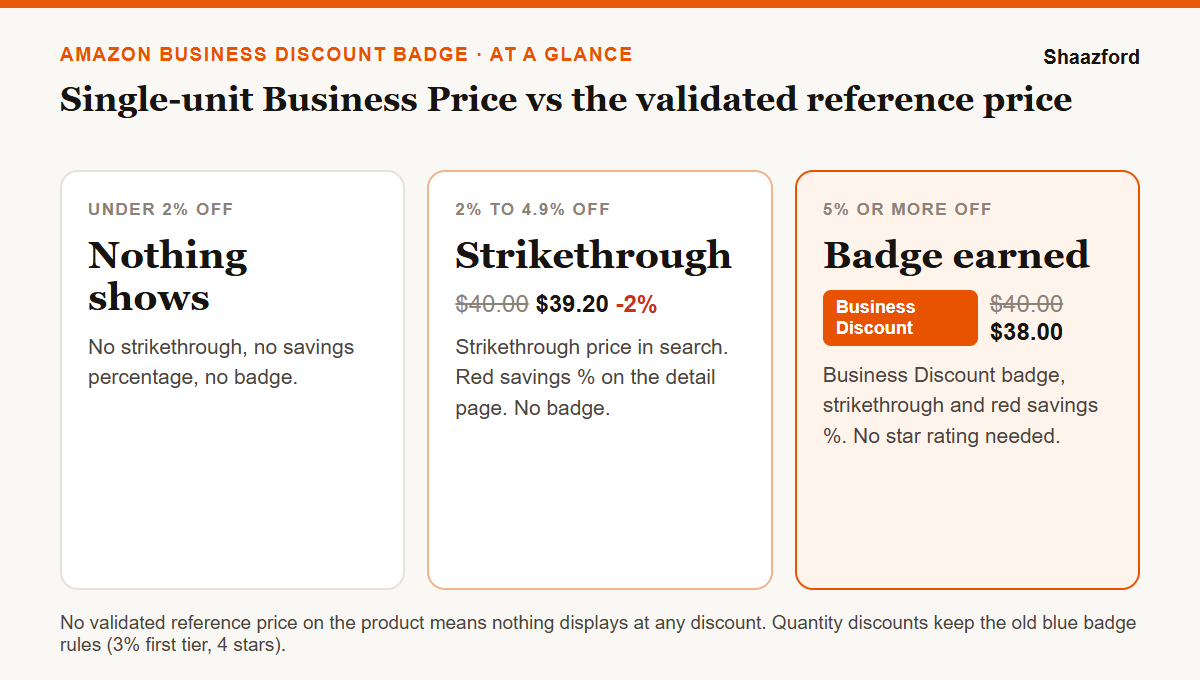
The Amazon Business Discount badge is the new savings badge Amazon Business buyers see on single-unit Business Prices. It replaces the blue Business Savings badge for single-unit offers. An offer earns it automatically when its single-unit Business Price is at least 5% below the product's validated reference price (VRP). The old 4-star rating requirement is gone. Offers 2% to 4.9% below the VRP show a strikethrough price but no badge, and a product with no VRP shows neither. Quantity discounts keep the old blue badge rules: at least 3% off on the first tier and a 4-star rating. Amazon announced the change on October 16, 2026 and said it would reach Amazon Business within two weeks.
Key takeaways
- The badge now needs a single-unit Business Price at least 5% below the validated reference price, not just 5% below your own standard price.
- The 4-star rating rule is gone for single-unit Business Prices, so products with few reviews can qualify.
- The new gate is the VRP. No VRP means no badge, no strikethrough and no savings percentage.
- Discounts of 2% to 4.9% still show a strikethrough price, but they do not earn the badge.
- Quantity discounts are unchanged: 3% off the first tier and a 4-star rating for the blue badge.
- A 5% cut can remove far more than 5% of your profit per unit. Run the margin math before you change a price.
What is the Amazon Business Discount badge?
Amazon Business is the side of Amazon where registered companies, schools, hospitals and government buyers shop. Sellers can give these buyers their own prices: a single-unit Business Price, quantity discounts for larger orders, or both. Business buyers see those prices. Regular shoppers do not.
Until now, a qualifying business discount earned the Business Savings Blue Badge. The new Business Discount badge takes over that job for single-unit Business Prices. It appears in search results and on product detail pages, next to a strikethrough price and a savings percentage shown in red. Amazon's pitch to sellers is "always-on visibility": a discount that stays visible as long as the price qualifies, without running a deal or a coupon.
What changed: the old blue badge vs the new Business Discount badge
| Rule | Old Business Savings Blue Badge (single unit) | New Business Discount badge |
|---|---|---|
| Discount needed | At least 5% below your standard price | At least 5% below the validated reference price (VRP) |
| Star rating | At least 4 stars | No rating requirement |
| Reference price | Your own standard price | A VRP must exist on the product |
| Discount of 2% to 4.9% | No badge | Strikethrough price in search, red savings percentage on the detail page, no badge |
| Quantity discounts | Blue badge at 3% off the first tier, with 4 stars | Unchanged: still the blue badge, 3% first tier, 4 stars |
Two of these changes help sellers and one makes the badge harder to earn. Dropping the star rule opens the badge to newer products. Measuring the discount against the VRP instead of your own standard price closes the easiest workaround: you can no longer raise your standard price to manufacture a 5% business discount.
How do I qualify for the Business Discount badge?
Three conditions, all on the same offer:
- A single-unit Business Price. The badge is for the per-unit price a business buyer pays for one unit. Quantity tiers are judged separately under the old rules.
- A validated reference price on the product. If Amazon has not validated a reference price for the ASIN, nothing displays, whatever your discount.
- A Business Price at least 5% below that VRP. If the VRP is $40.00, your single-unit Business Price must be $38.00 or lower.
There is no application. When an offer meets all three conditions, Amazon applies the badge automatically.
What is a validated reference price, and why might my product not have one?
A reference price is the "was" price Amazon shows next to a discount. Amazon only treats a price as a reference after validating it against real prices: what Amazon customers have recently paid, or what other retailers have recently offered. A price you type into Seller Central does not become a reference price just because you entered it.
For new products, this makes the badge harder to earn. A brand-new ASIN has little or no price history, so it may not have a VRP yet. The star rule is gone, but the reference price rule replaces it as the gate, and newer products are the ones most likely to fail it. Before you plan around the badge for a launch, check whether the product already shows a strikethrough or savings on any offer. If it shows nothing at any discount, it probably has no VRP yet.
What happens with a discount between 2% and 4.9%?
A single-unit Business Price at least 2% below the VRP shows a strikethrough price in search results. On the detail page, the savings percentage also appears in red. You do not get the badge until the discount reaches 5%.
On a product with thin margins, a 2% business discount buys a visible strikethrough at less than half the cost of a 5% cut. Test it on products where business buyers already order, and move to 5% only where the extra units cover the lost margin.
Do quantity discounts change?
No. Quantity discounts still earn the Business Savings Blue Badge under the old rules: at least 3% off on the first tier, and a product rating of at least 4 stars. If you already run quantity tiers that qualify, leave them alone. If you are setting them up, keep the first tier at 3% or more, and make each higher tier a lower per-unit price than the one before.
When does the new badge go live?
Amazon announced the change to sellers on October 16, 2026 and said the badge would be available on Amazon Business within the next two weeks. It gave no exact date, so watch your Seller Central notifications and check your own detail pages as a business buyer before you assume the badge is showing.
Should you cut your Business Price by 5%? Run the margin math first
A 5% price cut comes straight off your margin, so it removes a much bigger share of profit per unit than 5%. Here is a worked example. The costs are illustrative, so put your own numbers in.
| Per unit | Standard price | 2% off (strikethrough) | 5% off (badge) |
|---|---|---|---|
| Price to the business buyer | $40.00 | $39.20 | $38.00 |
| Landed product cost | $14.00 | $14.00 | $14.00 |
| FBA fulfillment fee (example) | $7.00 | $7.00 | $7.00 |
| Referral fee (15% in this example) | $6.00 | $5.88 | $5.70 |
| Profit per unit | $13.00 | $12.32 | $11.30 |
| Profit lost per unit | 5.2% | 13.1% | |
| Extra business units needed to break even | about 6% | about 15% |
In this example the 5% badge price cuts profit per business unit by about 13%, so business sales need to rise by about 15% just to earn the same money. The referral fee falls a little because it is a percentage of the sale price. The fulfillment fee does not fall at all. Check your own category with our Amazon referral fee calculator and the FBA profit calculator.
Four things decide whether the badge pays for itself:
- Business order volume. If business buyers rarely order a product, a badge on it changes little. Start with the ASINs where business orders already exist.
- Order size. Office, janitorial, industrial and medical supplies tend to sell in repeat and bulk orders, where one won account is worth many single sales.
- Your price floor. Set the lowest Business Price that still meets your target margin, and never go below it for a badge.
- Repricer rules. If software manages your prices, make sure it cannot drop the Business Price below your floor, or drift back above the 5% line and lose the badge. Our guide to automated pricing on Amazon covers how to set those limits.
A six-step checklist for the new badge
- List your business sellers. Pull the ASINs where business buyers already order, and rank them by business revenue.
- Check each for a reference price. No strikethrough at any discount usually means no VRP. Those products cannot earn the badge yet.
- Run the margin math. Work out profit at the standard price, at 2% off and at 5% off, after referral and fulfillment fees.
- Set the Business Price. In Seller Central, go to Inventory, then Manage All Inventory, and select Set next to Business price. For many products, use the Business Price and Quantity Discount file. Amazon's Business Discount Insights tool flags products that do not meet the badge price.
- Keep quantity tiers at 3% or more on the first tier for products with 4 stars or better, so they keep the blue badge.
- Check the result as a buyer. After the rollout, view your detail pages from a business account, confirm the badge or strikethrough shows, and review business sales after 30 days.
Business pricing also feeds into which offer business buyers see first, so read this alongside our guide to winning the Buy Box on Amazon. If you are building a wider B2B channel, our piece on B2B ecommerce and wholesale on Amazon covers the bigger picture, and our breakdown of what it costs to sell on Amazon in 2026 has the full fee picture.
How Shaazford handles Amazon Business pricing
For brands doing $100K or more a month, B2B pricing is included in our Amazon account management. We find the ASINs where business buyers already order, model the margin at each discount level, set Business Prices and quantity tiers with hard floors, and check every month whether the badge is earning its keep.
Pricing is flat: $1,600 a month for full account management, never a percentage of your sales or ad spend. Our fee does not rise with your revenue, so we only recommend a 5% business discount where the margin math works for you.