
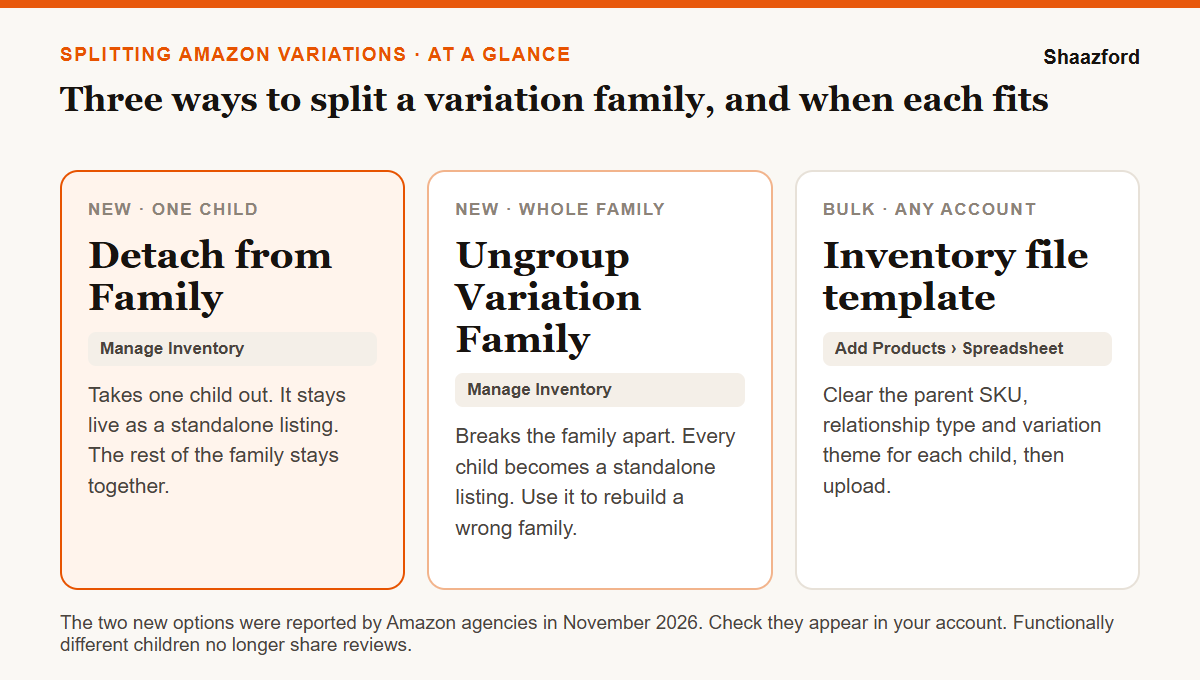
To split Amazon variations, you remove child ASINs from their parent so they sell as standalone listings. In early November 2026, Amazon agencies began reporting two new options in Seller Central's Manage Inventory: Detach from Family, which takes one child out of its variation family, and Ungroup Variation Family, which breaks the whole family into standalone listings. Amazon has not published a public help page on them yet, so check they appear in your account. Without them, you split a family with an inventory file template that removes the child's parent relationship, or by deleting the parent listing. Split when the children are different products, or when they differ in function and no longer share reviews under Amazon's 2026 review rule.
Key takeaways
- Two new Manage Inventory options are reported: Detach from Family for one child, Ungroup Variation Family for the whole family.
- Until they show in your account, the inventory file template is still the reliable way to split, and deleting the parent splits every child at once.
- Since Amazon's 2026 review change, children that differ in function no longer share reviews, so grouping them gains you less.
- Cosmetic variations like color and size still pool reviews. Splitting them gives that up.
- Before any split, save the family's data, each child's rating and review count, and the ad campaigns and deals tied to it.
- Split one child first, then check its page, inventory and reviews after 48 hours.
What does splitting a variation family mean on Amazon?
A variation family is one parent ASIN with several child ASINs under it. Amazon describes the parent as a non-buyable product that appears in search and ties the children together. The children are the products customers buy, such as each color or size. The variation theme is the attribute that links them, such as color, size or weight.
Splitting a family removes one or more children from that parent. Each removed child keeps its ASIN and becomes a standalone listing with its own detail page. The parent stays in place for any children you leave in it, or goes away if you ungroup the whole family.
What are Detach from Family and Ungroup Variation Family?
They are two options Amazon agencies began reporting in Manage Inventory in early November 2026. The goal is to let you separate products in a variation family from the inventory screen, without the Variation Wizard or a spreadsheet upload. From their names and the early reports:
- Detach from Family removes a selected child from its family. The child stays live as a standalone listing, and the rest of the family is unchanged.
- Ungroup Variation Family breaks the whole family apart, so every child becomes a standalone listing.
Amazon has not published a public help page on either option that we could check, and we have not confirmed whether they need Brand Registry or work in every category. Look for them next to the family's listings in Manage Inventory. If they are not there yet, use one of the methods below.
How do I split Amazon variations in Seller Central?
| Method | What it splits | Best for | Watch out for |
|---|---|---|---|
| Detach from Family (Manage Inventory) | One child at a time | Removing one wrong or underperforming child | Newly reported. Check it appears in your account before you plan around it. |
| Ungroup Variation Family (Manage Inventory) | The whole family | A family built on the wrong theme, which you will rebuild | Every child loses the family page at once. |
| Inventory file template | Any children, in bulk | Large catalogs and many families at once | A full update can overwrite fields you leave blank. Check your inventory after upload. |
| Delete the parent listing | The whole family | A workaround when nothing else works | Hard to reverse. You rebuild a family from scratch if you want one back. |
| Contact Selling Partner Support | Whatever Amazon agrees to | Families you cannot edit, such as listings another seller created | Slow, and you may need proof of brand ownership. |
Splitting with an inventory file template
Before the new options, this was the main way to split a family without deleting anything. Download the inventory template for the product's category from Add Products, then the Spreadsheet tab. List the child SKU you want to remove, and clear its parent relationship: the parent SKU, relationship type and variation theme fields. Upload the file and check the processing report for errors.
Sellers in Amazon's forums warn about two things. A full update can replace every field you leave blank, so fill in the listing's full data or use a partial update where your template supports it. And some uploads have reset inventory to zero, so check stock levels once the file has processed.
Deleting the parent listing
Deleting the parent separates every child from it, and each child stays live as a standalone listing. Sellers use this when they want the whole family gone. It is hard to undo: to group the products again, you build a new family and add the children to it.
If you sell through Vendor Central
Amazon's variation guide for vendors gives a different route for product types that Amazon groups automatically. Change the child's grouping attributes so they no longer match the other children in the family, and Amazon's system updates the child within 48 hours. For a child you do not manage, contact Amazon with proof of brand ownership and ask for it to be removed.
When should you split a variation family?
Split when the family is wrong for the buyer or when it costs you more than it earns:
- The children are different products. Amazon's own guidance says color and size variations should contain only color and size information, and that different models of a product do not belong in a color theme.
- A new version sits under an old one. Amazon advises creating a new listing for a new version of a product, not adding it as a variation of the older one.
- The children differ in function. Under Amazon's 2026 review change, these children no longer share reviews, so the main reason to keep them together is gone.
- One weak child pulls the family's rating down. Where reviews still pool, a poorly rated child lowers the rating every sibling shows.
Do not split cosmetic variations that still share reviews. A family of five colors with one pooled rating is usually stronger than five separate pages, each with a fifth of the reviews.
What happens to reviews when you split variations?
On January 7, 2026, Amazon told sellers it would stop sharing reviews across variations with significant functional differences. The change rolled out by category from February 12 through May 31, 2026, with sellers notified by email 30 days before their listings were affected. Color, pattern and size differences still share reviews. Differences in capacity, features or compatibility can split them. We covered what this means for listings in our guide to the variation review change.
When a child leaves its family, sellers report that it lands on its own page showing only the reviews written for that child ASIN. It loses the family's pooled count. Before you split, write down each child's own rating and review count, so you know what each page will show on its own.
What should you check before and after a split?
- Save the family. Download an inventory report with each child's SKU, ASIN, parent SKU and variation theme, so you can rebuild the family if you need to.
- Record ratings and reviews for each child, not just the family total.
- List ads and deals. Note the campaigns, coupons and deals that use these ASINs. If a deal or coupon is scheduled, wait until it ends, or check that it still shows after the split.
- Confirm you control the listing. Brand owners and listing creators have the most control. If another seller built the family, you may need Selling Partner Support.
- Split one child first. Use Detach from Family if you have it, or a one-row template upload.
- Check after 48 hours. Open the child's new page and confirm it is buyable, shows the right title, images and stock, and shows its own reviews. Check the remaining family page too.
- Watch it for a month. Track sessions, conversion rate and organic rank for each split child. A standalone child stands on its own sales history, so compare it with the four weeks before the split.
A split child needs a complete listing of its own: a full title that meets Amazon's title rules, images and bullets that make sense without the family around them. Our guide to creating and optimizing an Amazon listing covers each field, and how to optimize and manage Amazon listings covers keeping a large catalog in order.
How do you put a child back into a variation family?
Amazon's seller guide gives two ways. To add a variation to an existing family, go to Inventory, then Manage All Inventory, find the product and select Edit listing. To build a new family from standalone listings, use the Variation Wizard from the bottom of the Add Products page. Both need the children to fit the same variation theme.
How Shaazford handles Amazon variations
For brands doing $100K or more a month, catalog work is part of our Amazon account management. We audit every family against its theme, split the ones that hurt conversion, rebuild them correctly, and check each child's page, stock and reviews after every change.
Pricing is flat: $1,600 a month for full account management, never a percentage of your sales or ad spend.